

-
Download
Certificate Query
Certificate Query

 2026/10/9 11:02:47
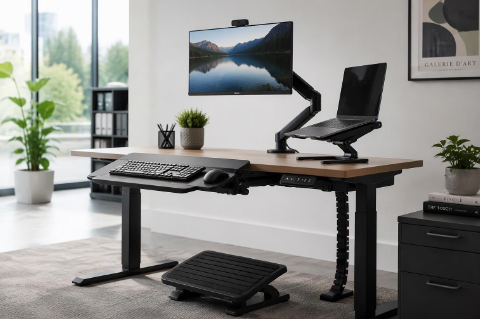
There is a predictable pattern in office furniture projects: most of the budget and attention goes to chairs and desks, then the accessories are chosen at the last minute, or skipped entirely. Yet the accessories often determine whether employees actually use the furniture as intended. A sit-stand desk, for example, delivers little benefit if the monitor stays at a fixed height.
Screen position drives posture. If the monitor is too low, users tilt their heads forward; too close, and they lean in. A monitor arm lets each person set height, distance and angle, and frees desk space that would otherwise be taken by a stand. For dual screens and laptop-plus-monitor setups, an arm keeps both screens aligned at the same eye level. Check weight ratings and desk clamp compatibility before ordering.
Footrests help shorter users and anyone whose feet do not reach the floor comfortably, which is common once desks are raised for standing work. Choose a model with an adjustable angle and a surface that is easy to wipe clean. Anti-fatigue mats serve the other end of the spectrum: they make standing periods tolerable and are worth pairing with sit-stand desks.
Keyboard trays and adjustable laptop stands bring the keyboard and screen into the right relationship: elbows near ninety degrees and the screen at eye level. Negative-tilt trays are useful for people who type with wrists extended. Where trays are not practical, a compact keyboard and an adjustable stand achieve a similar result.
Accessories are high-margin, low-freight items that customers appreciate being reminded of. Present them as recommended add-ons alongside each chair and desk, and keep a small core range — one monitor arm, one footrest, one tray, one laptop stand — rather than a long catalogue that confuses buyers. Standardising also simplifies installation and spares.
Ask us for our accessory recommendation sheet and bundle pricing to attach to your next workstation order.




Copyright www.hzfgfurniture.com. All Rights Reserved. 浙ICP备2026006019号
